
- Home
- About Us
- Courses
- 10 Best Reasons to Join Our Pro Digital Marketing Course – Career Guide 2025
- Digital Marketing for Working Professionals – Upgrade Your Skills Without Leaving Your Job
- Offline Digital Marketing Classes with Hands-On Training and Career Growth
- Online Digital Marketing Course – Master SEO, Social Media & Ads with Live Training
- Weekend Digital Marketing Batch – Start Your Career Without Weekday Hassle
- Basic Digital Marketing for Beginners – Learn the Essentials Step-by-Step
- Modules
- Tools
- Certifications
- Career Track
- Blogs
- Contact Us
Boost Coding Speed with ChatGPT 5 Codex in 2026

Boost Coding Speed with ChatGPT 5 Codex in 2026
If you’ve ever wished for an AI coding assistant that can write code, fix bugs, explain logic, and even build small projects with you, ChatGPT-5 Codex is exactly that.
Unlike regular chat tools, Codex understands programming deeply. It can generate code with AI, debug issues, refactor messy scripts, and help you learn faster. Whether you’re a student, developer, marketer, or business owner, learning How to Use ChatGPT-5 Codex can save hours of work every week.
This guide is practical and step by step. By the end, you’ll be able to use Codex confidently for coding, automation, and productivity.
Understand program structure and modules in this guide to the diploma digital marketing course.
What Makes Codex Different from Normal ChatGPT
Regular ChatGPT is excellent for writing, brainstorming, and answering questions. ChatGPT-5 Codex, however, is built to be a true AI coding assistant. It’s trained deeply on programming patterns, real codebases, and developer workflows so it understands how software is actually written, debugged, and improved.
Here’s what sets Codex apart in this ChatGPT Codex tutorial:
- Understands multiple programming languages like Python, JavaScript, HTML, CSS, SQL, and more
- Helps you generate code with AI from simple, natural prompts
- Detects bugs and suggests precise fixes so you can debug code with AI in minutes
- Writes complete functions, scripts, and even files with proper structure and comments
- Explains complex logic in simple words, making it ideal for students and beginners
- Builds mini projects directly from prompts from web pages to automation scripts
In short, while ChatGPT is great with words, Codex is great with code. It’s like having ChatGPT for programmers and surprisingly useful for non technical users who want to automate tasks, build tools, or understand how code works without feeling overwhelmed.
How to Access and Set Up ChatGPT-5 Codex
Getting started with ChatGPT-5 Codex is surprisingly simple. You don’t need to install any software, configure environments, or download plugins. If you can open ChatGPT, you can start using this powerful AI coding assistant in minutes.
Step 1 — Open ChatGPT
Log in to your ChatGPT account from your browser or app. This is where you’ll access Codex and begin your ChatGPT Codex tutorial experience.
Step 2 — Select the Coding-Capable Model (Codex)
Choose the model designed for programming tasks. This Codex-enabled mode is built to generate code with AI, understand multiple languages, and even debug code with AI using your prompts.
Step 3 — Start with a Clear Role-Based Prompt
Before asking for code, guide Codex with context. For example:
“Act as a senior Python developer and write clean, commented code.”
This simple step dramatically improves output quality and helps Codex respond like an expert.
That’s It No Setup Required
There’s no installation, no IDE setup, and no technical barriers. With clear prompts, you can instantly start using ChatGPT for programmers, students, marketers, or anyone who wants faster coding, automation, and productivity.
Step by Step: Writing Code with Codex
One of the fastest ways to understand how to use ChatGPT-5 Codex is by asking it to solve a real problem. Codex shines when you give it a clear task and let it generate code with AI in seconds.
Prompt Example
“Write a Python script that renames all files in a folder by adding today’s date as a prefix. Add comments and explain how to run it.”
What Codex Does for You
- Instantly generates clean Python code for the task
- Adds helpful inline comments so you understand every step
- Explains how to run the script on your system
- Suggests improvements or edge-case handling if needed
This is the real power of an AI coding assistant. You don’t just get code you get guidance, clarity, and learning built into the output.
And this isn’t limited to Python. With this ChatGPT Codex tutorial approach, you can request solutions in:
- JavaScript for web interactions
- HTML/CSS for layouts
- SQL for database queries
- Automation scripts for repetitive tasks
When you learn how to use ChatGPT-5 Codex this way, you turn simple prompts into fully working solutions while learning programming faster and more efficiently.
Compare programs and modules on the Code with TLS courses page.
Debugging Code with AI (Using ChatGPT-5 Codex)
Stuck on an error for hours? This is where an AI coding assistant like ChatGPT-5 Codex shines. Instead of searching forums and guessing fixes, you can debug code with AI in a few minutes.
What to do
Paste your code along with the exact error message and ask clearly:
Prompt example:
“Here is my JavaScript code and the error I’m getting. Please fix the issue, optimize the code, and explain why it failed.”
What Codex does for you
- Scans the code and pinpoints the exact problem
- Rewrites the broken part with the correct logic
- Explains the root cause in simple language
- Suggests improvements to avoid the same bug again
This is one of the most powerful parts of any ChatGPT Codex tutorial. You’re not just getting a fix you’re learning why the error happened.
Whether it’s JavaScript, Python, or web code, you can generate code with AI, repair it, and understand it at the same time. That’s how ChatGPT for programmers turns frustrating debugging sessions into quick learning moments.
Explaining Code in Simple Language with ChatGPT-5 Codex
One of the most powerful features of an AI coding assistant like ChatGPT-5 Codex is its ability to break down complex code into plain, beginner-friendly explanations. If you’re learning React, JavaScript, or any programming language, this becomes a game-changer.
Prompt Example
“Explain this React component like I’m a beginner. Describe what each part does and why it’s used.”
When you paste your code and use a clear prompt like this, Codex doesn’t just summarize it. It walks you through the logic step by step—explaining components, props, state, hooks, and flow in simple words.
This is where How to Use ChatGPT-5 Codex becomes incredibly practical for students and new developers. Instead of watching long tutorials, you can generate explanations with AI, ask follow-up questions, and truly understand what the code is doing.
It’s like having a personal tutor for ChatGPT for programmers who is available 24/7 to help you learn faster, clear doubts, and build confidence while coding.
If you’re curious about pay scale, see the updated report on digital marketing salary in India in 2026.
Building Small Projects with ChatGPT-5 Codex
One of the best ways to understand How to Use ChatGPT-5 Codex is by building small, real projects. Instead of reading theory, you can ask this powerful AI coding assistant to create working apps you can run instantly. This is where you truly see how to generate code with AI and learn faster.
Example Mini Projects You Can Build
- A To Do List App using HTML, CSS, and JavaScript
- A Weather App that fetches live data from an API
- A clean Blog Layout for a website
- A Form with Validation to handle user input correctly
These projects help students, developers, and even non-technical users practice real coding with the help of a ChatGPT Codex tutorial style workflow.
Prompt You Can Use
“Act as a senior web developer. Build a simple, responsive to-do list app using HTML, CSS, and JavaScript in a single file. Add comments to explain the code.”
With a prompt like this, Codex will generate code with AI, structure it properly, add styling, include logic, and even explain how it works. You can copy, run, and modify the project instantly making learning practical, fast, and highly productive.
Automating Repetitive Tasks with ChatGPT-5 Codex
One of the biggest advantages of learning How to Use ChatGPT-5 Codex is automation. Instead of spending hours on boring, repetitive work, you can ask this AI coding assistant to create small scripts that finish the job in seconds.
Codex helps you generate code with AI for everyday tasks that normally require manual effort or advanced programming knowledge.
Common Tasks You Can Automate
- Rename hundreds of files in one folder instantly
- Clean messy Excel/CSV data using Python
- Send automated emails from a list
- Convert CSV files into JSON format for web use
- Remove duplicates, format data, and organize records
These are tasks developers, marketers, students, and business owners deal with regularly. With a simple prompt, ChatGPT for programmers (and non-programmers) can write ready-to-run scripts for you.
Prompt Example
“Write a Python script to remove duplicate rows from a CSV file and save the cleaned file.”
Codex will:
- Generate the complete Python script
- Add comments to explain the logic
- Tell you how to run it step-by-step
This is a perfect example of how you can debug code with AI, automate data cleaning, and save hours of manual work using the ChatGPT Codex tutorial approach.
This list of the top ranked digital marketing institute in Delhi helps you compare training quality and placements.
Use Cases for Different People Getting Real Value from ChatGPT-5 Codex
ChatGPT-5 Codex helps different users achieve real results by automating complex tasks, improving productivity, and reducing manual effort. Developers use it to write, debug, and optimize code faster, while businesses rely on it for documentation, data processing, and workflow automation.
Developers
With How to Use ChatGPT-5 Codex in your workflow, you get a true AI coding assistant that speeds up daily development.
- Faster coding: Generate boilerplate, functions, and APIs in seconds using clear prompts to generate code with AI.
- Debugging support: Paste errors and instantly debug code with AI with explanations and fixes.
- Learning new frameworks: Ask Codex to build examples in React, Node, Django, or Flask and explain each step.
Students
This ChatGPT Codex tutorial becomes your personal programming tutor.
- Learn programming faster: Turn theory into working scripts and see how logic becomes code.
- Understand logic easily: Ask Codex to explain complex snippets in beginner-friendly language.
- Complete assignments: Build projects, fix errors, and add comments for clarity using ChatGPT for programmers.
Marketers
Non tech users can also generate code with AI for daily marketing needs.
- Landing page code: Create HTML/CSS sections, forms, and CTAs without waiting for a developer.
- Automate reports: Use simple Python scripts to clean data and format reports.
- Create tracking scripts: Generate UTM builders, event tracking snippets, and analytics helpers.
Business Owners
Codex helps you reduce dependency and move faster.
- Build small tools: Create calculators, forms, or mini dashboards.
- Automate workflows: Scripts for data cleanup, email tasks, and file handling.
- Save developer costs: Use ChatGPT-5 Codex to prototype ideas before hiring.
Best Prompts to Get Accurate Results
- “Act as a senior developer…”
- “Write clean, commented code…”
- “Explain step-by-step…”
- “Optimize this code for performance…”
The clearer the prompt, the better the output in this ChatGPT Codex tutorial.
Students in Delhi can check the detailed review of the best digital marketing course in South Delhi before enrolling.
Common Mistakes to Avoid When Using ChatGPT-5 Codex
Even the best AI coding assistant can give weak results if your prompts are unclear. When learning How to Use ChatGPT-5 Codex, avoiding these common mistakes will instantly improve the quality of code, explanations, and debugging help you receive.
Asking vague questions
Saying “write code for my project” is too broad. Be specific about the task, inputs, and expected output when you generate code with AI.
Not sharing the full error message
When you want to debug code with AI, always paste the complete error and the related code block. Codex needs context to find the real issue.
Forgetting to mention the programming language
Codex supports many languages. If you don’t specify Python, JavaScript, HTML, etc., the output may not match your needs in this ChatGPT Codex tutorial.
Not asking for explanation
Don’t just take the code. Ask Codex to explain the logic step-by-step. This is how you learn faster with ChatGPT for programmers and beginners alike.
Tips to Get Professional-Level Output from ChatGPT-5 Codex
Want truly production-ready results from your AI coding assistant? The secret isn’t just what you ask Codex to build it’s how you ask. Use these prompt upgrades to generate code with AI that’s clean, secure, and optimized like a pro.
Ask for well commented code
Tell Codex to include clear comments so you understand the logic and can maintain it later.
Prompt add-on: “Add beginner-friendly comments to every function.”
Ask for optimization
Don’t settle for working code—ask for efficient code.
Prompt add-on: “Optimize this for performance and readability.”
This helps you debug code with AI and improve speed and structure.
Ask for security improvements
Especially for web apps and forms.
Prompt add-on: “Review this code for security risks and fix them using best practices.”
Ask for best practices
Make Codex follow modern standards used by professionals.
Prompt add-on: “Rewrite this using industry best practices and clean architecture.”
These small prompt tweaks turn a basic ChatGPT Codex tutorial interaction into professional-grade development support.
Explore the rising demand for automation and careers through this guide on AI digital marketing jobs in 2026.
Real Examples with Prompts and Outputs (ChatGPT Codex Tutorial)
These practical demos show how to use ChatGPT-5 Codex as an AI coding assistant to generate code with AI and debug code with AI in minutes.
Example 1 — Generate Code with AI (Responsive Navbar)
Prompt you give Codex:
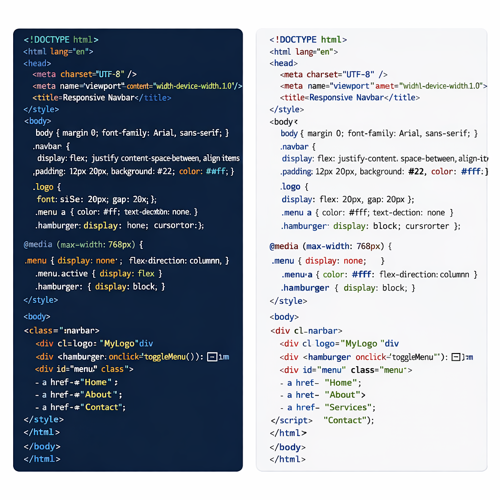
“Create a responsive navbar using HTML and CSS. Add a logo on the left, menu links on the right, and a hamburger menu for mobile screens. Keep the code clean and commented.”
Why this is powerful:
In a single prompt, ChatGPT for programmers creates production-ready UI code with responsiveness and comments—saving you design and debugging time.
Visit the official Code with TLS website to explore expert–led programs in digital marketing, web development, and more.
Example 2 — Debug Code with AI (Python Error Fix)
Prompt you give Codex:
“Fix this Python error: IndexError: list index out of range. Here is my code:”
items = ["apple", "banana"]
print(items[2])
What Codex outputs (sample):
items = ["apple", "banana"]
# Correct way: check length before accessing index
if len(items) > 2:
print(items[2])
else:
print("Index out of range. List has only", len(items), "items."
Explanation Codex provides:
The error occurs because the list has only two elements (index 0 and 1). Accessing index 2 causes the failure. The fix ensures safe indexing.
Why this matters:
You can debug code with AI instantly, understand the root cause, and learn best practices at the same time.
Using Codex for Web Development Projects
One of the most powerful ways to understand How to Use ChatGPT-5 Codex is by applying it to real web development tasks. As an AI coding assistant, Codex can help you generate code with AI, structure layouts, style pages, and add functionality without writing everything from scratch.
With the right prompts, you can quickly build:
- Landing pages with responsive HTML/CSS layouts and clean design structure
- Forms with validation, input handling, and user-friendly UI
- Portfolio websites to showcase projects using modern design patterns
- Basic web apps like to-do lists, calculators, weather apps, or dashboards
Instead of manually coding line by line, you describe what you need, and Codex produces organized, commented code you can edit and deploy. This makes ChatGPT for programmers incredibly useful for speeding up development and learning best practices at the same time.
Whether you’re a student learning web design or a developer prototyping faster, using Codex for web projects helps you move from idea to working page in minutes.
Productivity Hacks with Codex That Save Hours of Work
Using Codex as your AI coding assistant is not just about writing code it’s about working smarter and finishing tasks in a fraction of the time. Here’s how you can unlock serious productivity with these practical hacks.
Convert Logic to Code Instantly
Have an idea in plain English? Describe it, and Codex will generate code with AI in your preferred language. Instead of thinking about syntax, you focus on the logic while Codex handles the implementation.
Try this prompt:
“Convert this logic into Python code with comments…”
Turn Pseudocode into Real Scripts
If you think in steps or flowcharts, Codex can translate your pseudocode into clean, runnable scripts. This is incredibly useful for beginners and pros who want to prototype fast using a reliable ChatGPT Codex tutorial approach.
Try this prompt:
“Here is my pseudocode. Turn it into optimized JavaScript.”
Generate Documentation Automatically
Codex can read your code and produce clear documentation, saving you hours of writing. This is perfect for teams, GitHub projects, and client handovers — a huge win for ChatGPT for programmers.
Try this prompt:
“Write documentation for this code explaining each function.”
Write Test Cases Without Effort
Testing is often skipped because it’s time-consuming. Codex can debug code with AI by generating unit tests and edge-case scenarios automatically.
Try this prompt:
“Create unit test cases for this function covering edge cases.”
These small hacks turn Codex into a daily productivity engine for coding, automation, and development workflows.
Conclusion
Mastering How to Use ChatGPT-5 Codex feels like unlocking a genuine developer superpower. With this AI coding assistant, you can generate code with AI, debug code with AI, automate repetitive tasks, and understand programming logic with far greater clarity and speed.
If you have questions or need course guidance, reach out via the Code with TLS contact page to connect with the support team.
Rather than replacing developers, ChatGPT-5 Codex acts as a smart partner that makes you dramatically more productive. You spend less time stuck on errors and more time building, testing, and shipping real projects. Whether you’re a student learning faster, a developer optimizing workflows, or a marketer automating scripts, this ChatGPT Codex tutorial approach changes how you work.
Start applying these techniques today, and you’ll quickly realize that coding, debugging, and automation no longer need to be slow or frustrating. With Codex by your side, you won’t go back to the old way of doing things.
Contact details
Call Us
+91 85278 66980
Email Us
info@codewithtls.com
Visit Us
2/81-82, Ground Floor, Lalita Park, Gali No - 2, Laxmi Nagar, New Delhi - 110092
FAQs
1. What is ChatGPT-5 Codex?
ChatGPT-5 Codex is an advanced AI coding assistant that can generate code with AI, explain logic in simple terms, and debug code with AI across multiple languages.
2. Can beginners use Codex easily?
Yes. This ChatGPT Codex tutorial approach works great for beginners because Codex can break down complex code into step-by-step explanations.
3. Which programming languages does Codex support?
Codex supports popular languages like Python, JavaScript, HTML, CSS, SQL, and many more used in web development and automation.
4. Can Codex really debug my code?
Absolutely. Paste your code and the error message, and Codex will identify the issue, fix it, and explain why it happened.
5. Is Codex useful for web development projects?
Very. You can use ChatGPT for programmers to create layouts, forms, scripts, and even small web apps quickly.
6. How do I get more accurate results from Codex?
Use clear, specific prompts like “Act as a senior developer,” mention the language, and ask for commented, optimized code.
7. Can Codex help automate repetitive tasks?
Yes. It’s excellent for writing Python scripts and workflows to automate data cleaning, file handling, emails, and reports.
8. Is Codex helpful for students learning programming?
Definitely. It helps students learn programming faster, understand logic, complete assignments, and practice real examples with guidance.
By Best Digital Marketing Course on February 4, 2026